LEGO® DUPLO® World NETFLIX
- 3.2
- Rating
- 100.00K
- Installs
- Free
- Price

 Analysis by App-foxy
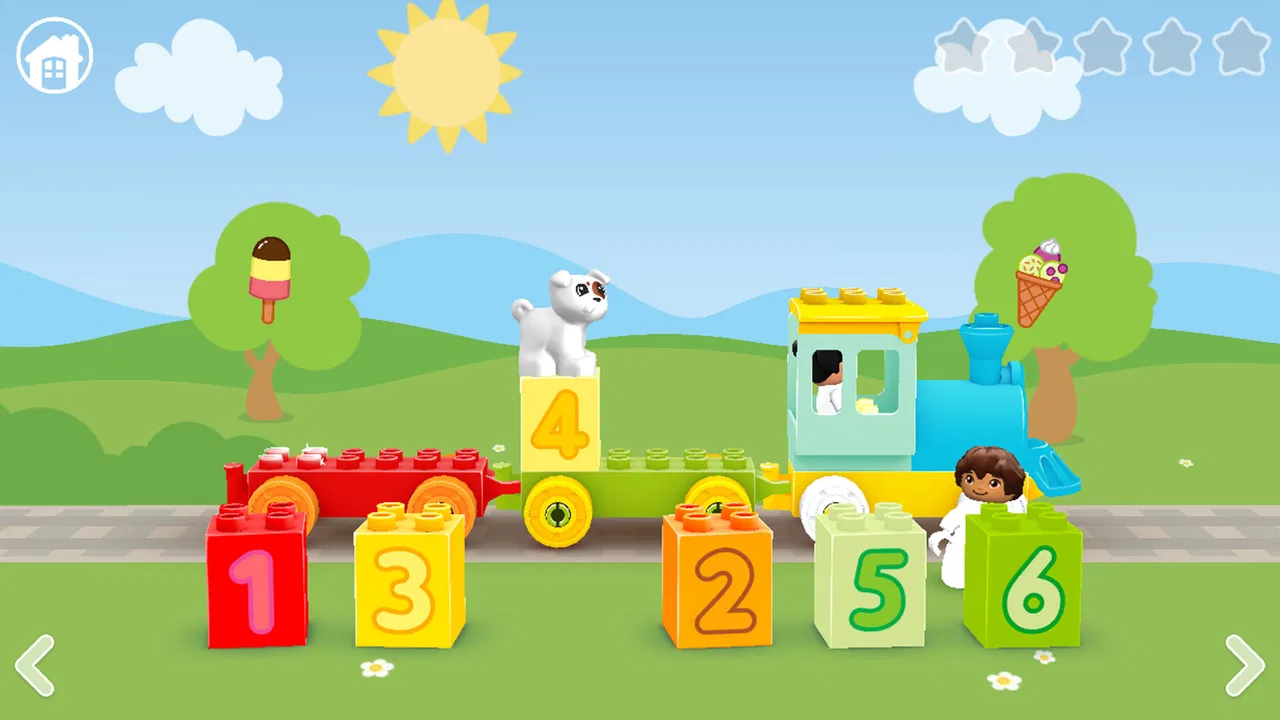
When I look at LEGO® DUPLO® World NETFLIX, I see a children’s educational game that tries to make early learning feel like play rather than a lesson. The idea is simple: children interact with colorful LEGO DUPLO settings while building, exploring, and responding to age-appropriate activities. That makes it especially appealing for parents who want something more purposeful than a standard distraction app.
I spent time considering how it fits into ordinary family routines, not just how attractive the concept sounds. My overall impression is positive, but with an important qualification: this is best treated as a guided play option for younger children, not as a complete learning program or an endlessly varied game. Its strongest qualities are its approachable theme, gentle educational direction, and low barrier to entry. Its weaker side is that a child who wants constant novelty may eventually find the available activities less exciting.
How the game feels in everyday use
The first thing I noticed is that the experience is designed to reduce friction for children who may not yet be comfortable with complex controls. The LEGO DUPLO identity helps because the objects and settings are immediately familiar, even when a child is seeing them through a screen. Instead of asking a young player to understand menus, inventories, or complicated objectives, the game places attention on recognizable building and discovery activities.
You May Also Like

 Blood Strike: 2.5 Anniversary
Blood Strike’s Loadouts Turn Every Drop Into a Tactical Gamble
A close look at Blood Strike’s custom loadouts: how fast access to signature weapons reshapes its battle royale rhythm, rewards preparation, and narrows the gap between fights.

 Pandora - Music & Podcasts
Pandora’s Music Is Easy to Start, but Harder to Recover
Pandora’s strength is its low-effort path from a seed to a station. Its weak spot is how much confidence it asks you to place in connection, setup, and quiet recovery.

 8 Ball Pool
8 Ball Pool Is Built on Rivalries, Rematches, and Routine
A close look at the rivalries, rematches, shared routines, and unanswered safety questions that turn a quick pool match into a persistent mobile community.

 Samsung Music
Samsung Music’s Quiet Strength Is Playing What You Already Own
Its reach comes less from spectacle than from dependable access to a personal library. That simplicity is both the app’s strongest retention engine and its ceiling.

 AccuWeather: Weather Radar
AccuWeather Review: A Quick, Clear Forecast for Everyday Decisions
For everyday plans, the best forecast is the one you can understand quickly. AccuWeather makes rain timing, radar, and local conditions easy to act on, with a few trade-offs.

 Hill Climb Racing
Why Hill Climb Racing Still Turns Crashes Into One More Run
A tiny car, a bumpy hill and one more upgrade: Hill Climb Racing keeps resurfacing because its simple chaos makes every near-miss feel personal.
More From Our News Desk
View All News


That matters for speed expectations. I would not judge this game by the same standard as a fast arcade title. Its pace is intentionally calm, with time for a child to look at the scene, try an action, and understand what changed. For a preschool-age player, that slower rhythm can feel comfortable. For an older child accustomed to rapid challenges, it may feel too gentle.
On a suitable device, I would expect the main limitation to be the hardware rather than the educational concept. The game is visually richer than a basic flash-card application because it presents animated LEGO-style environments, but it is not trying to be a demanding console-scale production. In practical terms, parents should think of it as a moderate interactive play experience: more engaging than a static worksheet, but less technically intense than a large action game.
The current release is version 41, and the game is intended for devices running Android 10 or later. That requirement is useful when deciding whether an older family phone or tablet is appropriate. A device that meets the operating-system requirement may still deliver a better experience if it has enough free storage, a responsive touchscreen, and a battery that can handle a child’s session without constantly interrupting play.
What children actually get from the activities
The educational value comes from the way the child is encouraged to connect actions with results. Building something, choosing an object, or helping a scene progress can support early observation, sequencing, and problem-solving. I would not present it to a child as “homework.” It works better when an adult frames it as a shared activity and asks simple questions about what the child is doing.
One useful approach is to let the child try first, then talk about the result. If a youngster immediately taps through every prompt, I would pause and ask what they think will happen before allowing the next action. This turns a short digital activity into a conversation about prediction and cause and effect. That small change is one of the easiest ways to get more learning value without making the session feel like a test.
Another practical tip is to use it during a transition rather than as an unlimited background activity. A brief session before dinner, during travel, or while waiting for an appointment gives the game a clear purpose. If it stays available for long stretches, the educational intention can fade and the child may simply repeat familiar interactions.
How it handles busy moments
The most demanding moments are likely to come when a child moves quickly between interactive scenes or when the device is already busy with other applications. I would be especially careful with older tablets that have limited memory or are nearly full. Even a game that feels light during ordinary play can become less responsive when the operating system is managing many background tasks.
For a smoother family setup, I would close unused applications before handing over the device, keep the screen clean, and avoid starting a session when the battery is nearly empty. Those are ordinary maintenance steps, but they matter more with young children because a brief pause or reload can be interpreted as the game being broken. A child is less likely than an adult to wait patiently through a technical interruption.
Heavy use also includes repeated sessions by more than one child. If siblings share a tablet, I would give each child a clear turn and watch how they interact with the controls. The game may be designed for individual touchscreen play, so two children reaching for the same screen can create confusion even when the software itself is working correctly. Taking turns also makes it easier to notice whether one child understands the activity or is simply copying the other.
Parents should also consider heat and battery behavior during longer play. I would not expect this to be as demanding as a graphically intensive action game, but animated scenes and continuous screen use still consume resources. If the tablet becomes warm or the battery drops quickly, shorter sessions are the sensible answer. That protects comfort and keeps the experience from turning into a frustrating race to find a charger.
Stability and recovering from interruptions
Reliability is particularly important in a children’s title. A grown-up may tolerate restarting an app, but a young player can lose interest immediately if progress seems to disappear or the screen stops responding. My practical recommendation is to let the game settle after opening it before passing the device to a child, especially on an older phone or tablet.
If an interruption happens, I would use a simple recovery routine: wait briefly, return to the game if the system allows it, and only then consider closing and reopening the app. Restarting too quickly can make a child think their actions were lost, while a calm explanation helps them understand that the device, not their play, caused the problem.
I also prefer testing any children’s app before using it during an important quiet moment. Open it at home, explore the opening flow, and see how the device behaves after switching away and returning. This is not about expecting perfection; it is about learning whether your particular tablet handles the game comfortably. Devices vary widely, so a short trial is more useful than assuming that every Android 10 device will feel identical.
The developer is Netflix, Inc., which gives the game a recognizable home within Netflix’s wider entertainment ecosystem. Still, I would judge it as a standalone children’s experience rather than assuming that the Netflix name guarantees a particular level of performance on every device. The practical questions remain the same: does the child understand the controls, does the tablet stay responsive, and can the family use it without constant technical help?
Device fit, access, and family expectations
The game is free, which makes it easier to consider for a family that wants to try it without making a separate purchase decision. Its content rating is Everyone, so its presentation is aimed at a broad family audience rather than older children seeking mature themes. That does not mean every child will enjoy it equally. Younger children who like building and imaginative play are the natural audience, while older children may want deeper rules, competition, or longer-term goals.
The operating-system requirement deserves attention before installation. Android 10 is not an extreme requirement, but it can exclude very old devices that families keep as spare tablets. I would check the system version first rather than assuming that any device capable of running other children’s apps will also be suitable here.
Screen size also changes the experience. A larger tablet is usually more comfortable for a child who is learning where to tap, and it gives an adult more room to sit beside them and participate. A small phone can work for a quick try, but it is less convenient for shared play and may encourage the child to hold the screen too close. If the goal is family interaction, I would choose the largest responsive screen available.
Storage is another quiet consideration. I would leave room for the installation and for normal system operation instead of filling the device completely with videos, photos, and games. A crowded device can make every application feel less dependable. This is not a special weakness of the title; it is simply a sensible part of preparing an older family device for children.
Because the game is educational, some parents may wonder whether it can replace books, physical DUPLO bricks, or adult-led activities. In my view, it cannot and should not. The screen is useful for demonstrating sequences, inviting exploration, and keeping a child engaged during a short break. Physical building remains better for touch, spatial awareness, and open-ended creativity, while books are better for sustained language and shared storytelling.
Where it beats ordinary alternatives
Compared with a basic alphabet or counting app, this game has a more tactile, imaginative feel. It can appeal to children who resist direct drills because the learning is wrapped in familiar building play. Compared with a video, it asks the child to make choices rather than only watch. That difference is meaningful: even a simple interaction can encourage attention and prediction in a way passive viewing does not.
Compared with physical LEGO DUPLO play, the digital version is more guided and easier to use in situations where carrying bricks is inconvenient. A parent on a long wait or a child resting at home may appreciate having a compact activity ready. The trade-off is that digital building cannot provide the same physical feedback, mess-free experimentation, or freedom to combine pieces in unlimited ways.
Compared with broad children’s game collections, the focused LEGO DUPLO presentation may feel safer and easier to explain to a young player. The downside is variety. A large collection can offer many genres and challenge levels, while this experience is more specialized. If your child wants racing, puzzles, stories, and competitive games in one place, another children’s platform may provide more breadth.
Its average rating is 3.2 from around 329 ratings, with four written reviews shown alongside it. I would read that as a reason to keep expectations measured rather than as a final verdict. A small review pool can reflect very different devices, ages, and family expectations. For this particular game, the important question is whether your child enjoys gentle LEGO-themed exploration, not whether it can satisfy every type of young player.
Who should use it and who should pass
I would recommend trying it for a child who already enjoys DUPLO-style building, benefits from visual prompts, or needs a calm activity that has more purpose than random tapping. It is also a sensible choice for parents who want to sit beside their child and turn a short game into a conversation. The free price lowers the risk of testing it, provided the device meets the software requirement.
I would be more cautious if your child becomes frustrated by slow pacing or expects a clear reward system after every action. Children who prefer competitive challenges, complex construction tools, or rapidly changing levels may outgrow the experience quickly. In those cases, a more advanced building game or a physical construction set may be a better match.
I would also skip it as a primary choice if you are looking for independent, extended play with no adult involvement. The game can occupy a child for a while, but its strongest value comes from occasional guidance. Asking “Why did you choose that?” or “What should we build next?” helps transform the app from a disposable distraction into a shared learning moment.
A realistic family routine
Imagine a child waiting while a parent finishes preparing dinner. I would set up the tablet at the kitchen table, open the game, and agree on a short session before handing it over. The child could explore a building activity while the parent checks in between tasks. Rather than leaving the child alone with it indefinitely, the parent might ask for a quick explanation of what was built and then end the session at a natural stopping point.
That routine solves several common problems at once. The child gets an engaging activity, the adult keeps some awareness of what is happening, and the game does not become the automatic answer to boredom. It also makes performance problems easier to notice. If the device slows down in that calm setting, you can fix the issue before taking it on a trip or offering it during a more stressful wait.
For travel, I would test the app at home first and prepare the device rather than relying on a last-minute installation. A child’s patience is limited when a family is already moving between places. Keeping the session short, lowering distractions around the screen, and bringing a non-digital alternative such as a small book or physical toy creates a better balance than expecting one app to carry the entire journey.
My final performance verdict
My view is that LEGO® DUPLO® World NETFLIX succeeds best as a calm, accessible educational game for younger children who enjoy familiar building themes. It is not designed to replace hands-on play, and I would not choose it for older children demanding deep challenge. Its performance expectations are reasonable for a modern Android device, but an older or crowded tablet may make any children’s app feel less dependable.
The strongest practical advice is to treat it as a short, shared activity: prepare the device, test the opening experience, watch how your child responds, and use questions to extend the learning. That approach makes the modest pace feel intentional rather than slow. It also gives parents a clearer sense of whether the game is genuinely helping their child explore or merely filling time.
With over 100 thousand installs, it has clearly reached a meaningful audience, while the Everyone rating and free price make it approachable for families who want to experiment. I would recommend giving it a try if your child likes LEGO DUPLO’s visual world and benefits from gentle guidance. I would choose a different option when the priority is advanced construction, extensive variety, or fully independent long sessions. For the right age and routine, though, LEGO® DUPLO® World NETFLIX is a useful screen-time choice when play, conversation, and early learning need to meet in one place.
FAQs for LEGO® DUPLO® World NETFLIX
01What is LEGO® DUPLO® World NETFLIX?
LEGO® DUPLO® World NETFLIX is an interactive educational game designed for young children, generally focused on preschool-age players. It offers colorful activities built around familiar DUPLO characters, vehicles, animals, and everyday situations. Children can explore scenes, complete simple tasks, build objects, and interact with animations in a safe, playful environment intended to encourage creativity and early learning.
02Do I need a Netflix subscription to play LEGO® DUPLO® World NETFLIX?
Yes. This edition is distributed through Netflix Games, so an active Netflix membership is normally required to access and play it. There are no separate in-game purchases in the usual Netflix Games model, which makes the experience more suitable for families who want to avoid advertisements and unexpected payments. Availability can depend on the Netflix plan, country, and device compatibility.
03Is LEGO® DUPLO® World NETFLIX suitable for toddlers and preschool children?
The game is aimed primarily at young children, especially toddlers and preschoolers who can benefit from simple touch-based activities. Its controls are designed to be easy to understand, with large objects, colorful visuals, and limited reading requirements. However, children develop at different rates, so younger players may still need help navigating menus or understanding what each activity is asking them to do.
04Does the game include ads, purchases, or online multiplayer?
LEGO® DUPLO® World NETFLIX is designed as a premium Netflix Games experience, meaning it generally does not include traditional third-party advertisements or separate in-app purchases. It is mainly a solo game for one child to explore on a compatible device, rather than an online multiplayer title. Parents should still review Netflix account and device settings, particularly if children can access other content.
05Can LEGO® DUPLO® World NETFLIX be played offline?
You may need an internet connection to download the game, verify Netflix access, and complete initial setup. After installation, some gameplay may be available offline, but this can vary according to the device, operating system, and Netflix requirements. For the most reliable experience, open the game while connected to the internet before traveling, and make sure the device has enough storage and battery.
Pros
- Simple controls make it accessible for preschoolers.
- Creative activities encourage imaginative play and exploration.
- Bright LEGO visuals are engaging without being overwhelming.
- Offline play is useful for travel and areas with limited internet.
- Progress feels rewarding as children unlock new play opportunities.
Cons
- Requires a Netflix subscription to access the full game.
- Some activities may feel repetitive after extended play sessions.
- Large download size can use considerable device storage.
- Limited challenge may not suit older children.
- Performance can vary on older phones and tablets.

LEGO® DUPLO® World NETFLIX
Gallery